DELIMa 3.0 – Latest Features Users Need to Know
July 22, 2026
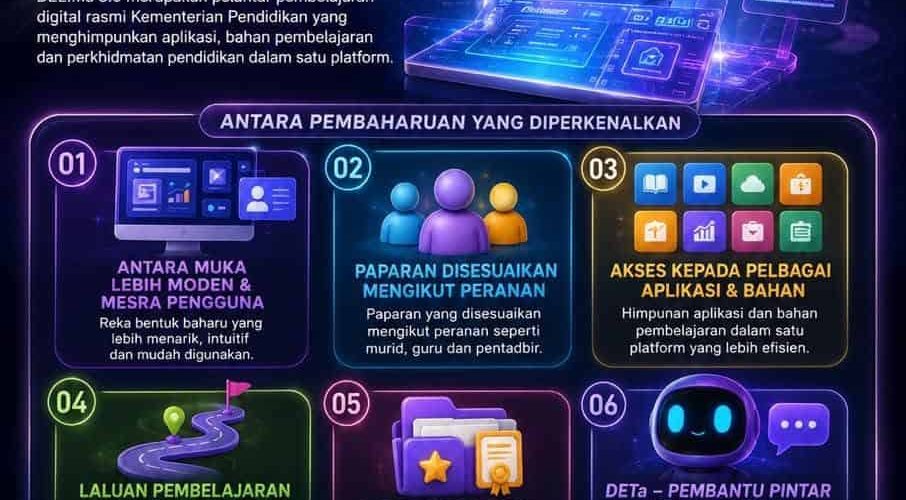
DELIMa 3.0 is the official digital learning platform of the Ministry of Education that brings together applications, learning materials and educational services in one platform.
The DELIMa 3.0 portal can be accessed through the following link:
It acts as a one-stop center (one-stop centre) which combines various artificial intelligence (AI) applications to support digital teaching and learning (PdP) sessions.
Let’s refer to more information about DELIMa 3.0 including its latest features below.
What is DELIMA 3.0?
Digital Education Learning Initiative Malaysia (DELIMa) is the Ministry of Education’s official digital learning platform developed specifically to revolutionize education based on AI technology.
DELIMa 3.0 is the latest updated version of the DELIMa portal that has been used before.
In line with the demands of the times, this version 3.0 improvement is designed by integrating Artificial Intelligence (AI) technology through a smart assistant known as DETa.
In addition, DELIMa 3,0 also provides a self-directed ‘Learning Pathways’ feature, automatic collection of digital portfolios, as well as a combination of world-class global applications such as Google Classroom, Microsoft 365, and Canva under one roof.
DELIMa 3.0 not only acts as a more structured learning platform but also proves the country’s progressive commitment in producing a digitally literate generation that is competitive at the global level.
ALSO READ: PMX AI – How to use Datuk Seri Anwar Ibrahim’s AI avatar on WhatsAppPMX AI
DELIMA 3.0 update
Among the reforms introduced are:
- A more modern and user-friendly interface.
- Customizable view according to roles such as students, teachers and administrators.
- Access to various applications and learning materials in one platform.
- DATAa smart assistant based on artificial intelligence (AI) that supports the teaching and learning process.
- Learning Pathwhich helps learning in a more structured way.
- Portfolio Digitalwhich brings together certificates, badges and user achievements.
Who Can Use DELIMA 3.0?
DELIMa 3.0 is provided for the entire Ministry of Education educational ecosystem, including:
- Student
- Guru
- School administrator
- PPD officer
- JPN officer
- Citizens of the Division
The display and functions will be automatically adapted according to the user’s role.
DELIMA 3.0 function
Through DELIMa 3.0, users can:
- Access various learning applications in one platform.
- Follow training and digital courses.
- Using the learning materials provided.
- Receive official announcements from the Ministry of Education, JPN, PPD or schools.
- Collect certificates and digital badges.
- Keep record of achievements in Digital Portfolio.
DETa, AI Assistant DELIMa 3.0
DETa (Digital Education Teaching and Learning Assistant) is DELIMa’s smart assistant that helps students, teachers and education people get information, learning suggestions and platform usage support faster.
DETa can help:
- Answering questions related to the use of DELIMa.
- Recommend appropriate learning materials.
- Helping teachers plan lessons and prepare ideas for PdP activities.
- Helping students understand learning content based on educational resources.
- Provide guidance related to applications and services in DELIMA.
DELIMA Learning Path 3.0
Learning Path is one of the exciting innovations in DELIMa 3.0.
Through the Learning Path feature, users can explore learning content in a more organized manner based on their needs and learning levels.
The Learning Suggestions found in this learning path are:
- DIGITAL TEXTBOOK – Access digital textbooks anytime and anywhere.
- LEARNING VIDEOS – Various interactive videos to understand the topic more interestingly.
- SUPPORT MATERIALS – Additional materials that help deepen knowledge and understanding.
- LEARNING ACTIVITIES – Interactive activities to strengthen skills and self-assessment.
- RELATED EDUCATIONAL APPLICATIONS – A collection of educational applications to support more holistic and effective learning.
Digital Portfolio, User Track Record
Another new feature of DELIMa 3.0 is the Digital Portfolio.
Digital Portfolio is a space that gathers learning records and user achievements throughout using DELIMa.
This portfolio allows users to:
- View the obtained digital certificate.
- Store digital badges.
- Record participation in training and activities.
- Build learning records centrally.
How are digital certificates and badges awarded?
DELIMa will automatically record user achievements for activities that deserve recognition.
Among the forms of recognition provided are:
- Digital Certificate
- Digital Badge
- Record of achievements in Digital Portfolio
All these recognitions can be accessed through the user profile.
How to Login DELIMA 3.0
To log in to the DELIMa 3.0 portal, you only need to log in using the DELIMa account provided by the Ministry of Education.
Refer to the methods below:
- Visit the DELIMa 3.0 portal through the following link: landing
- Enter DELIMA’s email and password
- Click “Login to DELIMa”
- After logging in, the display and functionality will be automatically adjusted according to the user’s role.
You can access this DELIMa 3.0 portal without hesitation. This is because it uses security and identity verification mechanisms provided by the Ministry of Education to ensure user access and learning data are always protected.
Existing Learning Applications Are Still Accessible
Even if you log into the DELIMa 3.0 system, you can still access all existing learning applications such as:
- Google Workspace
- Google Classroom
- Kahoot!
- Canva
- Google Meet
and more!
More Information & FAQ DELIMa 3.0
For any questions and the latest information about DELIMa 3.0, please refer to the official DELIMa 3.0 portal (d3.delima.edu.my)
DELIMa 3.0 comes with a more modern, fast, and device-friendly interface. This new version focuses on the empowerment of AI through DETa, the introduction of Digital Portfolios and the Learning Pathways feature for self-directed learning.
– Students: ID and password can be obtained directly from the respective Class Teacher.
– Teachers & Administrators: IDs are managed and supplied by the Bestari Coordinating Teacher (GPM) or the school’s ICT Teacher.
Students cannot change or reset their own passwords. If forgotten, the student needs to inform the Class Teacher or the school’s ICT Teacher to reset the password through the school’s admin system.
Yes. This portal is cloud-based. You can access it anytime and anywhere as long as your computer device, tablet, or smartphone has internet access.
– Student
– Guru
– School administrators
– PPD officer
– JPN officer
– Citizens of the Division
Users only need to log in using the DELIMa account provided by the Ministry of Education. After logging in, the display and functionality will be automatically adjusted according to the user’s role.
PakarPBN
A Private Blog Network (PBN) is a collection of websites that are controlled by a single individual or organization and used primarily to build backlinks to a “money site” in order to influence its ranking in search engines such as Google. The core idea behind a PBN is based on the importance of backlinks in Google’s ranking algorithm. Since Google views backlinks as signals of authority and trust, some website owners attempt to artificially create these signals through a controlled network of sites.
In a typical PBN setup, the owner acquires expired or aged domains that already have existing authority, backlinks, and history. These domains are rebuilt with new content and hosted separately, often using different IP addresses, hosting providers, themes, and ownership details to make them appear unrelated. Within the content published on these sites, links are strategically placed that point to the main website the owner wants to rank higher. By doing this, the owner attempts to pass link equity (also known as “link juice”) from the PBN sites to the target website.
The purpose of a PBN is to give the impression that the target website is naturally earning links from multiple independent sources. If done effectively, this can temporarily improve keyword rankings, increase organic visibility, and drive more traffic from search results.